- Tools
- SharePoint Online, Vitextra Short URL Online
The Create shortened URL form of the Short URL Online web part with the Name, Origin URL, Domain and Short URL fields filled in and the Create button highlighted.
Open a SharePoint Page in Edit Mode
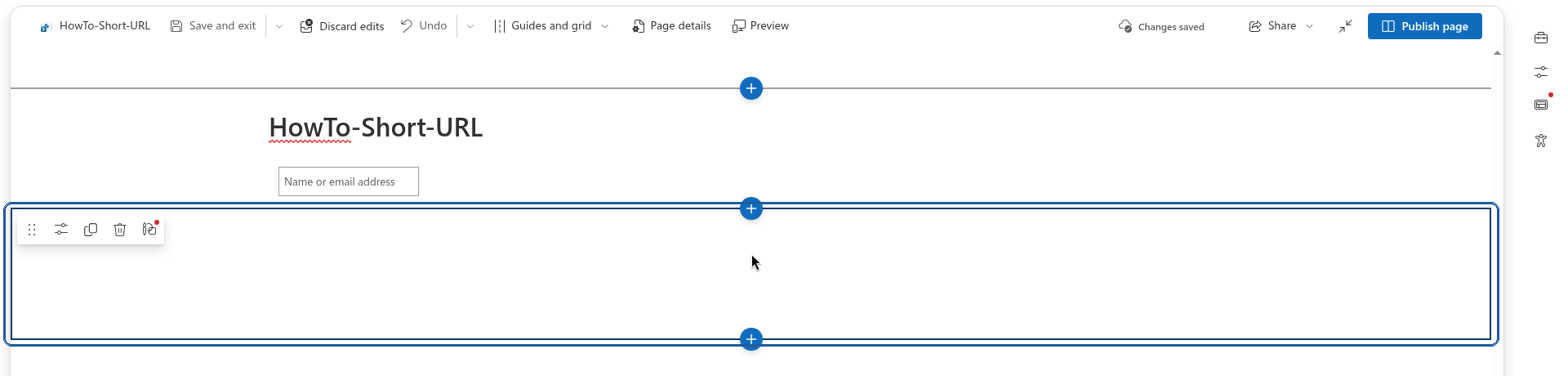
Open the SharePoint page where you want to place the Short URL web part in edit mode, or create a new page.
Add the Short URL Web Part
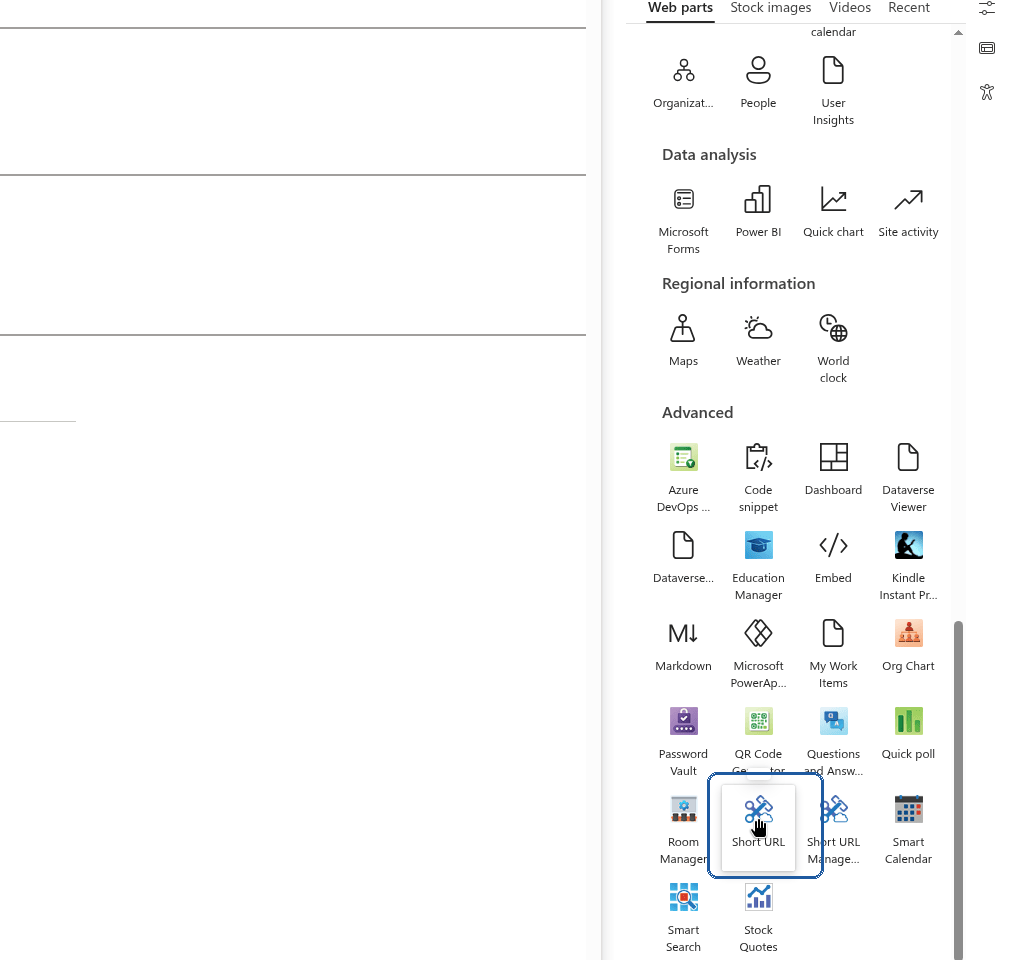
Select a line with a circled +, like this:

Click the circled plus to add a web part A list of available web parts appears. Scroll down to find the Short URL Online web part and select it.
Save the Changes

Change the title of the web part if you need to, then select Publish to save the changes.
Create a New Shortened URL

Type in the information about the new shortened link:
- Name (optional) — an internal label to help you recognize the link later; it is not part of the URL.
- Origin URL (required) — the target URL where the user will be redirected.
- Domain (required) — one of the domains available to your tenant.
- Short URL (required) — the custom suffix that appears after the domain.
💡 Tip
Short URL supports special characters such as ?, #, %, &, and others, so you are not limited to plain letters and numbers when choosing a custom suffix.Click the Create button to create the new shortened link. Once the link is created, you can use it or share it right away.
📝 Note
You can change both the domain and the URL of a link after it has been created, without losing its click history.
Link to this page
Found this useful? Copy a ready-made link for your blog, wiki, documentation or forum answer.
HTML
<a href="https://vitextra.com/en/support/how-to/create-shorten-link-in-sharepoint-online">How To Create a Short Link in SharePoint Online</a>Markdown
[How To Create a Short Link in SharePoint Online](https://vitextra.com/en/support/how-to/create-shorten-link-in-sharepoint-online)Citation
How To Create a Short Link in SharePoint Online. Vitextra Knowledge Base. Updated Oct 22, 2026. https://vitextra.com/en/support/how-to/create-shorten-link-in-sharepoint-onlineHow to
Step-by-step guides
How To Color Folders in SharePoint Online
The context menu of a folder in the List Filter Online web part with the Folder Color submenu open, showing the palette of 16 preset colors.
How To Export a SharePoint List to Excel
The downloaded workbook open in Excel: a formatted table whose columns match the columns of the web part, with the totals row at the bottom.

How To Export a User Profile as a Business Card (vCard)
The downloaded vCard opened as a contact card showing the name, e-mail, job title, company, address and phone numbers of the employee.

How To Add Employee Directory App to Microsoft Teams
Microsoft Teams with the Employee Directory (Employees) icon pinned in the left app bar, and the app open showing the employee search page with quick filters and a grid of employee cards.