The Vitextra List Filter web part for SharePoint lets you export list data to a Microsoft Excel file. The export always includes the complete list, no matter how many items it contains.

Prerequisites

Before you can export, activate the Vitextra: List Filter site collection feature and add the List Filter web part to the list view or the page where the list is displayed.

For details, see the Configure List Filter article.

Export Feature

To show the Export button, click Settings on the filter panel, select Excel under the Export heading, and click Save:
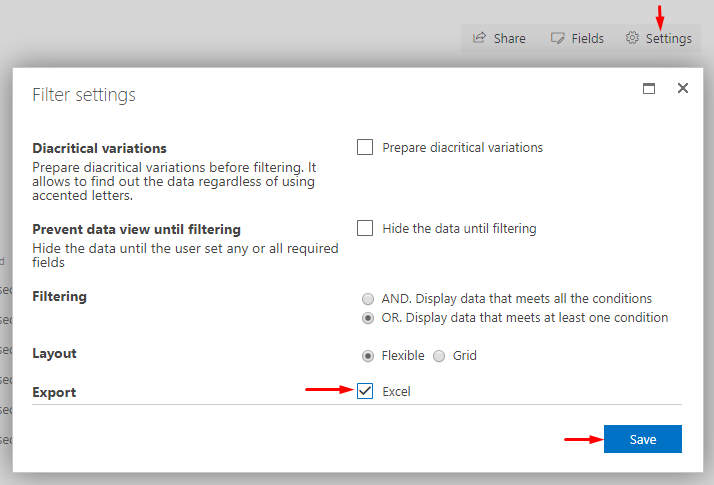
SharePoint List Filter settings dialog

SharePoint List Filter settings dialog

Export List Data

To export the list data to Excel, click Export on the filter panel:
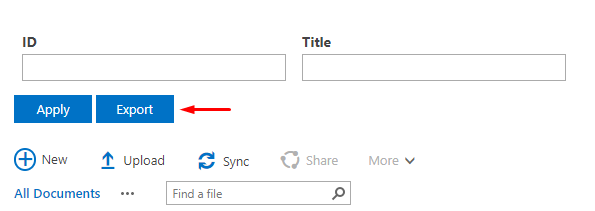
Export button

Export button

The exported file contains the same columns as the current view:
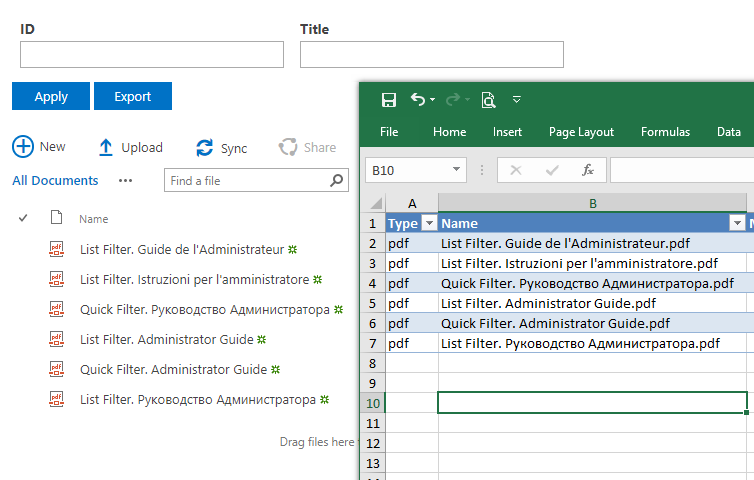
Exported Data

Exported Data

📝 Note
Vitextra List Filter exports data according to the view settings, the user's permissions, and any filters currently applied.


Questions and answers

Ask a question about this article and get an official answer from our team.

No questions yet. Be the first to ask.

Featured Articles

Employee Directory vs. Employee Directory (Entra ID): Which Web Part to Choose

Compare the two Vitextra directory web parts - Employee Directory (SharePoint search or Microsoft Graph) and Employee Directory (Entra ID) - by data source, search, refinement panel, filter editor, exclusions, A–Z navigation, skills search and export, and find out which one fits your scenario.

107 10 min
Microsoft Graph Permission Files.ReadWrite.AppFolder: Why Password Vault Needs It and How to Approve It

Why the Vitextra Password Vault web part requests the delegated Microsoft Graph permission Files.ReadWrite.AppFolder, what the permission allows and what it does not, how a Global Administrator approves it on the API access page of the SharePoint admin center, and what users see until it is approved.

31 4 min
List Filter Online Query Builder: Conditions, Groups and the CAML Query Behind Them

Reference for the Query Builder of the Vitextra List Filter Online web part: where to find it, how conditions and AND/OR groups work, which operators are available for each column type, how dynamic conditions such as Current User and Last X Years are resolved, how the predefined filter combines with user filters, and how to view the generated CAML query.

108 10 min

Share