This article describes how to set up Vitextra Smart Search to search recorded Teams meetings stored in OneDrive or SharePoint.

Add Web Part

Open the page where you want to add the web part in edit mode.

Click the circled + icon, scroll down, and select Smart Search from the list of available web parts.
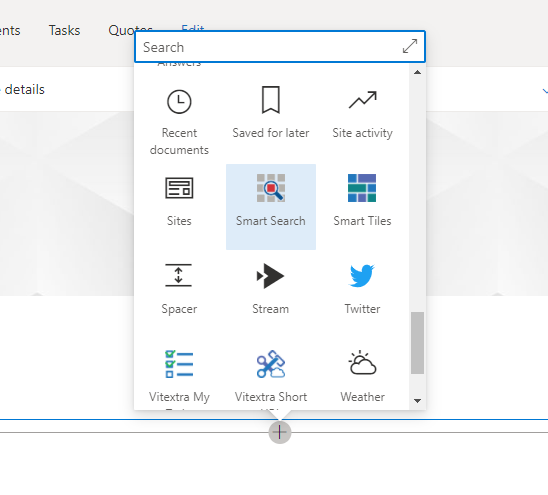
Web Part Gallery

Web Part Gallery

Configuration

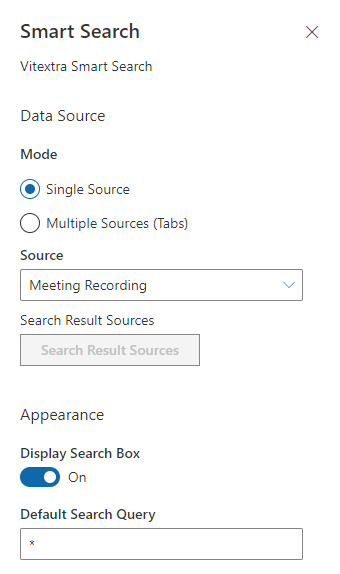
Open the Smart Search web part configuration page and apply the following settings:

  1. Mode - Single Source
  2. Source - Meeting Recording
  3. Default Search Query - *
  4. Sort By - Last Modified
  5. Sort Direction - Descending

The asterisk in Default Search Query makes the web part show results as soon as it loads, so the user doesn't have to run a search first.

💡 Tip
The last two settings (Sort By and Sort Direction) are optional. Use them when you want the most recently modified videos to appear at the top.
Web Part Settings

Web Part Settings

Publish the page to save your changes.

Using It

With the Smart Search web part, users can search recorded Teams meetings and filter the results by author and recording date.
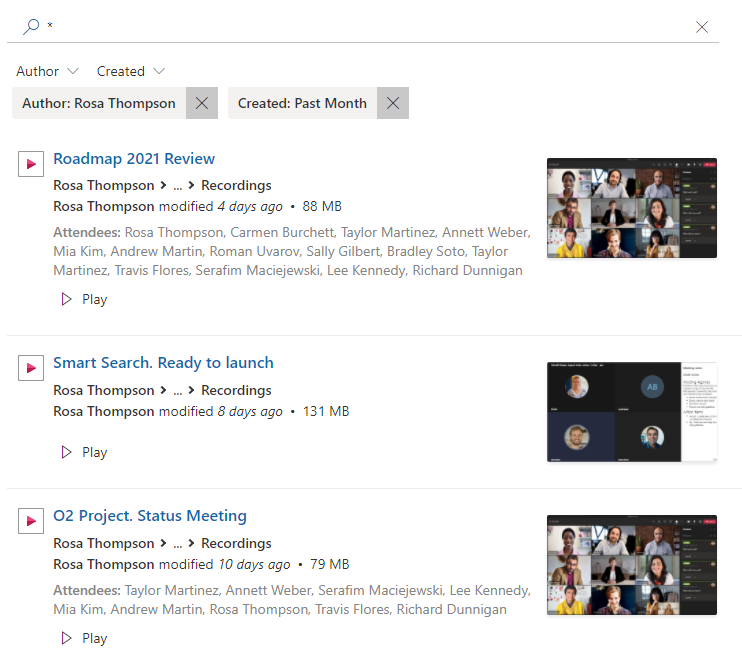

Smart Search. Search Recorded Meeting

Smart Search. Search Recorded Meeting

Questions and answers

Ask a question about this article and get an official answer from our team.

No questions yet. Be the first to ask.

Featured Articles

Pinning, Featuring and Locking Topics

How moderators pin, feature and lock topics in Vitextra Discussions: the Pinned, Featured and Locked buttons in the topic view, how a pinned topic stays at the top of every view, how the Featured view and the Featured default view work, what a locked topic allows and forbids, how unlocking restores the status, and how the same flags look in the Discussions Topics list.

33 5 min
RSS in Modern SharePoint Online: Why There Is No Built-in Web Part and What to Use Instead

Why modern SharePoint Online pages have no RSS web part, what the classic RSS Viewer did, and a comparison of the ways to show external RSS feeds on a modern page: a Power Automate flow into a list, the Embed web part with a third-party widget, a custom SPFx web part and the Vitextra RSS Reader - with the pros, cons and effort of each.

53 7 min
RSS Reader: Frequently Asked Questions

Short answers to the common questions about the Vitextra RSS Reader web part for SharePoint Online and Microsoft Teams: supported feeds and formats, number of sources, internal and password-protected feeds, how often items refresh, layouts and images, filters and search, Teams tabs and the personal app, permissions, where data goes, licensing and the trial.

49 6 min

Share