Absence & Coverage
 Overview
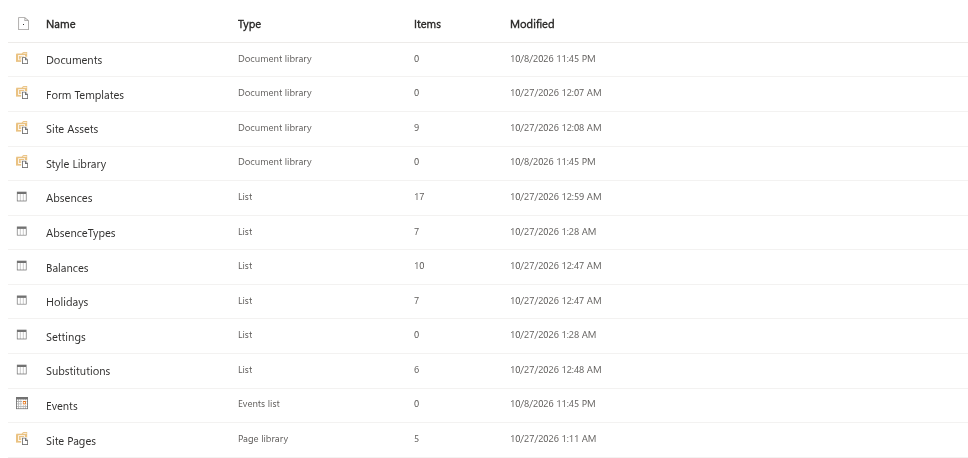
The three web parts of Vitextra Absence & Coverage — My Absences, Team Absence Calendar and Substitutions — keep all of their data in six standard SharePoint lists on one site, the product site. The site belongs to your own Microsoft 365 tenant, so absence requests, balances and substitutions never leave it; no external service stores them. The only call to an outside service is the license check.
This article is a reference for administrators, HR staff and site owners: which lists exist, what each of them holds, what the important columns mean, who is expected to edit which list, and which rules keep the data intact.
The six lists at a glance
The lists are created automatically when a site is selected for the first time (see KB10324. How to Add the Absence & Coverage Web Parts to a Page and Select the Site). They are ordinary custom lists that are not shown in the site navigation, so open them from Site contents.
| List | What it stores | Needed by the web parts | Edited by |
|---|---|---|---|
AbsenceTypes | The catalogue of absence types: name, color, approval, privacy, half days, yearly allowance | Yes | HR or the site owner, directly in the list |
Absences | One row per absence request, with its status, approver and number of working days | Yes | Employees and approvers, through the web parts |
Substitutions | One row per substitution, temporary or handover of duties | Yes | Employees and managers, through the web parts |
Balances | Yearly entitlement and carry-over days per person and absence type | Optional | HR, directly in the list |
Holidays | Public and company holidays that are not counted as working days | Optional | HR, directly in the list |
Settings | Product settings as key and value pairs | Optional | The site owner, directly in the list |
If Balances, Holidays or Settings is missing or empty, the web parts use defaults and keep working. If one of the three required lists is missing, the web parts cannot load their data.
📝 Note
If a list with the same name already exists on the site, the product reuses it and does not overwrite or repair it. Columns are added only when the list is created, so a list that was created by hand with missing columns stays incomplete.
The Absences list
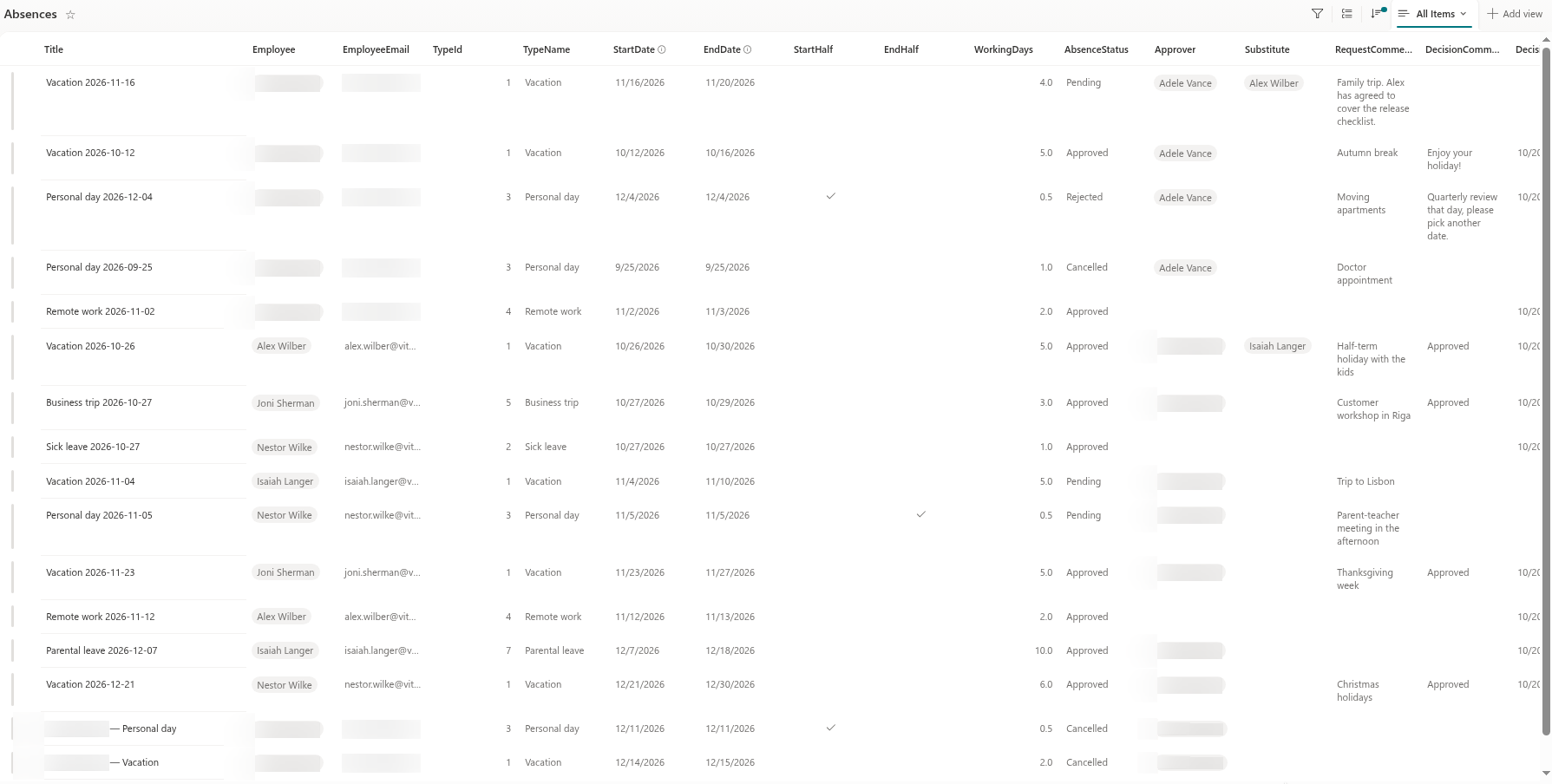
Every request created in My Absences becomes one row. Employees change it only through the web parts.
| Column | Contains |
|---|---|
Title | A readable label made of the employee name and the absence type |
Employee | The employee (Person). My Absences does not use this column to find "my requests" |
EmployeeEmail | The employee's e-mail address as text. This column is what the web parts match against, so it must stay filled |
TypeId | The item ID of the absence type in the AbsenceTypes list |
TypeName | A copy of the type name made when the request was submitted |
StartDate, EndDate | The first and the last day (date only) |
StartHalf, EndHalf | Yes/No: the first or the last day counts as half a day |
WorkingDays | The number of working days counted when the request was submitted |
AbsenceStatus | Pending, Approved, Rejected or Cancelled |
Approver | The person who decides on the request |
Substitute | The substitute named in the request, if any |
RequestComment | The employee's comment |
DecisionComment, DecisionDate | The approver's reply and the date of the decision |
The Substitutions list
| Column | Contains |
|---|---|
Title | A readable label "absent person → substitute" |
AbsentUser, Substitute | The person who is away and the person who covers |
StartDate, EndDate | The period; the end date may stay empty for a handover of duties |
Kind | Temporary or Handover |
SubstitutionStatus | Pending, Accepted, Declined or Cancelled |
Scope | The responsibilities text (shown as "Responsibilities" in the web part) |
AbsenceId | The ID of the related request; 0 for a substitution that is not tied to any request |
The columns of the three lookup lists are described in the articles that show how to maintain them: AbsenceTypes in KB10352. How to Add and Configure Absence Types, Balances in KB10353. How to Set Yearly Entitlements and Carry-Over Days, Holidays in KB10354. How to Add Public Holidays, and the Settings keys in KB10355. How to Set the Working Week, KB10356. How to Set the Fallback Approver and KB10357. How to Allow Negative Balances.
Who edits what
- The
AbsencesandSubstitutionslists are written by the web parts with the rights of the signed-in user. Create, approve, reject, cancel, accept and decline — all of this is done in My Absences and Substitutions. Do not edit these rows in the list view; see KB10358. Why You Should Edit Absences in the Web Parts and Not in the List View. AbsenceTypes,Balances,HolidaysandSettingsare reference data. This version has no administration web part, so HR or the site owner edits them directly in the lists.
Permissions and data location
Every employee who uses the web parts needs Member (edit) access to the product site, because the web parts read and write the lists with the signed-in user's own rights. The Microsoft Graph permission User.Read.All, which a tenant administrator approves once, is used only for people data such as profile, manager, direct reports and photos — not for the lists.
❗ Important
Everyone with edit access to the site can open the lists and read the rows, including absence types marked as private. The privacy rule of the calendar hides details in the web parts only; item-level permissions are not part of this version. If strict confidentiality matters, limit who has access to the product site. See KB10345. Private Absence Types: What Colleagues See in the Calendar.
Keep the internal names
The web parts read and write the columns by their internal names, which are the names used in the tables above. Therefore:
- do not rename, delete or change the type of these columns, and do not rename the lists;
- you may add columns of your own — they are ignored by the web parts — but do not make them required, because the web parts create rows without them and SharePoint would reject such rows;
- you may extend the choices of your own columns, but not the choices of
Category,AbsenceStatus,KindandSubstitutionStatus, which the product interprets.
💡 Tip
Before you change anything in a list, export it or make a copy of the site. For a first look at how the lists work together, read KB10350. How Absence Requests and Substitutions Work Together.
Read limits
The web parts load only a limited number of rows per query. For normal use the limits are far above what a company needs, but they are useful to know for large installations.
| Data | Limit |
|---|---|
| Absence types | 200 |
| Balance rows of one person for one year | 200 |
| Holidays in the requested period | 500 |
| Settings rows | 100 |
| Own requests in My Absences | 500 |
| Requests in the calendar window | 2000 |
| Requests waiting for approval | 200 |