Discussions
Overview
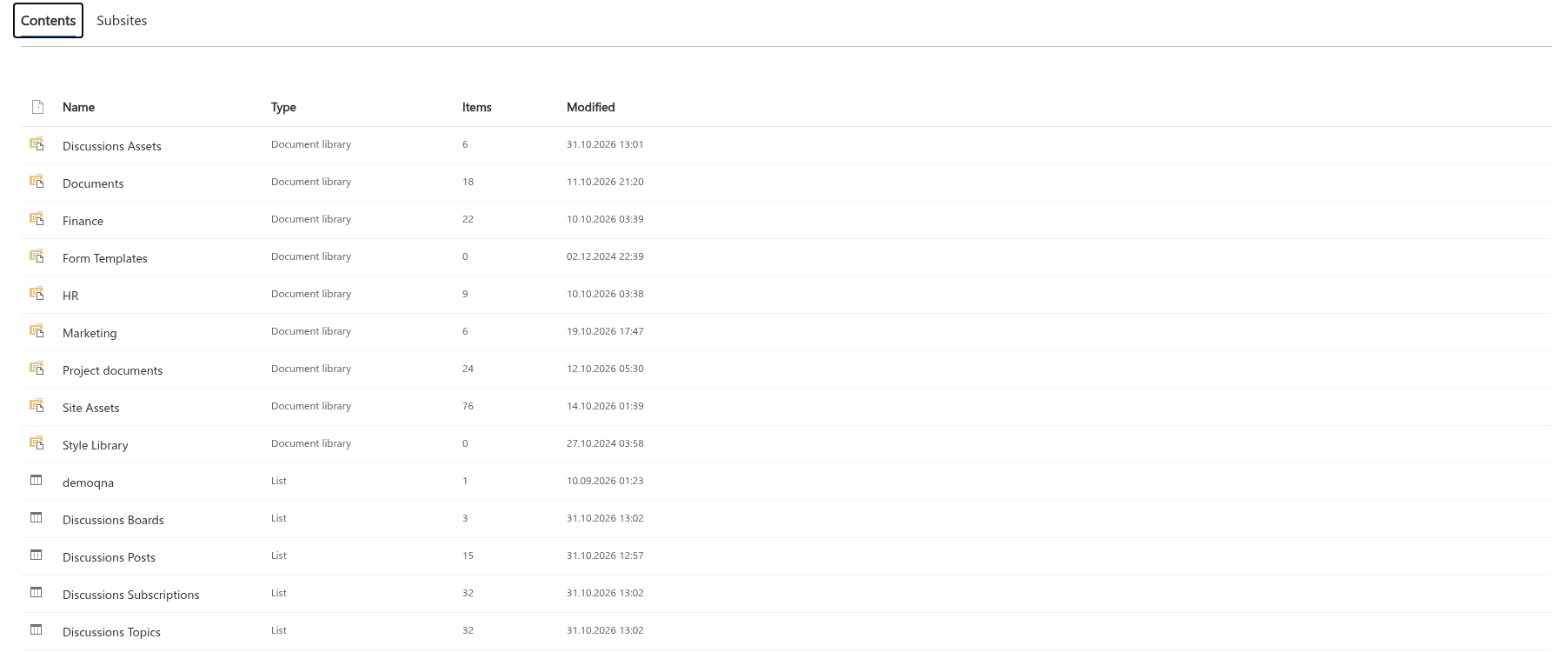
Discussions stores everything in five lists of the site where the board was created: four custom lists and one document library. They are ordinary SharePoint lists in Site contents, covered by the site permissions, versioning, retention and search like any other list. This article is the reference for their columns - for administrators who build views, reports or flows on the lists, and for anyone who needs to correct an item by hand. Where the data lives and what leaves the tenant is covered in KB10411. Where Discussions Stores Your Data: Lists, Columns and Privacy; this article is about the schema. The version described is 26.10.3.
How the lists are created and recognised
The lists are created by the web part the first time a site owner creates a board on the site (New board on the Not Configured screen). This requires the Manage Lists permission. Every list is created with these settings:
- versioning on, content types off, grid editing off, not hidden, included in search crawling;
- attachments enabled on the four lists; folder creation enabled only in the library;
- every custom column is added to the default view.
The list titles are taken from the interface language of the user who creates them: Discussions Boards, Discussions Topics, Discussions Posts, Discussions Subscriptions, Discussions Assets on an English site, Доски обсуждений, Темы обсуждений, Сообщения обсуждений, Подписки обсуждений, Файлы обсуждений on a Russian site. The column display names follow the same rule; the internal names are always the ones in the tables below and always start with Vtx.
The web part does not depend on the titles. Each list is recognised by a marker column with a fixed ID, so a list can be renamed freely and still found: it is looked up first by its default title, then among the visible lists of the same template by the marker column.
| List | Default title | Template | Marker column | Holds |
|---|---|---|---|---|
| Boards | Discussions Boards | Custom list | Mode (VtxMode) | One item per board: mode, categories, approval rule |
| Topics | Discussions Topics | Custom list | Board (VtxBoard) | One item per topic with its counters and status |
| Posts | Discussions Posts | Custom list | Topic (VtxTopic) | One item per reply, with the parent reply and the thread path |
| Subscriptions | Discussions Subscriptions | Custom list | Target type (VtxTargetType) | Who follows which board or topic, and how often |
| Assets | Discussions Assets | Document library | Discussions asset (VtxDiscussionsAsset) | Inline images of posts, in a folder per year |
📝 Note
A site that was set up with an earlier version may lack the Discussions Subscriptions list, the Discussions Assets library and the moderation columns. The web part adds the missing lists and columns as soon as a user with Manage Lists opens a page whose web part was configured before the two lists existed; board setup (Create board and Use board) always runs the same check, so columns introduced by later versions are added there as well. A list or column that already exists (recognised by its ID) is never created twice; users without Manage Lists only look the lists up.
In the tables below, Indexed means that the column was created with a SharePoint index so that filters on it stay fast on large lists. Default is the value SharePoint assigns when an item is created without the column; the web part sets most columns explicitly.
Discussions Boards
One item per board. Title is the board name shown in the Board drop-downs. Moderators edit the title, the description, the mode, the categories and the approval setting in the Board settings panel of the web part; the list form is an alternative.
| Column | Internal name | Type | Indexed | Default / values | Purpose |
|---|---|---|---|---|---|
| Description | VtxDescription | Multiple lines of text (plain) | No | Empty | A description of the board, edited in the Board settings panel; not shown by the web part in this version |
| Mode | VtxMode | Choice | No | Discussion, QnA, Mixed; default Discussion | The mode of the board: discussions only, questions and answers only, or both. New boards are created with Mixed unless another mode is chosen |
| Categories | VtxCategories | Multiple lines of text (plain) | No | Empty | The categories of the board, one name per line; see KB10423. Organizing Topics with Categories |
| Topics | VtxTopicCount | Number | No | 0 | The number of topics of the board: set to 0 at creation, increased when a topic is created and decreased when a topic is deleted from the web part (best-effort); not shown by the web part in this version |
| Require approval | VtxRequireApproval | Yes/No | No | No | Yes: topics and replies of users without Manage Lists are created as Pending and wait in the moderation queue |
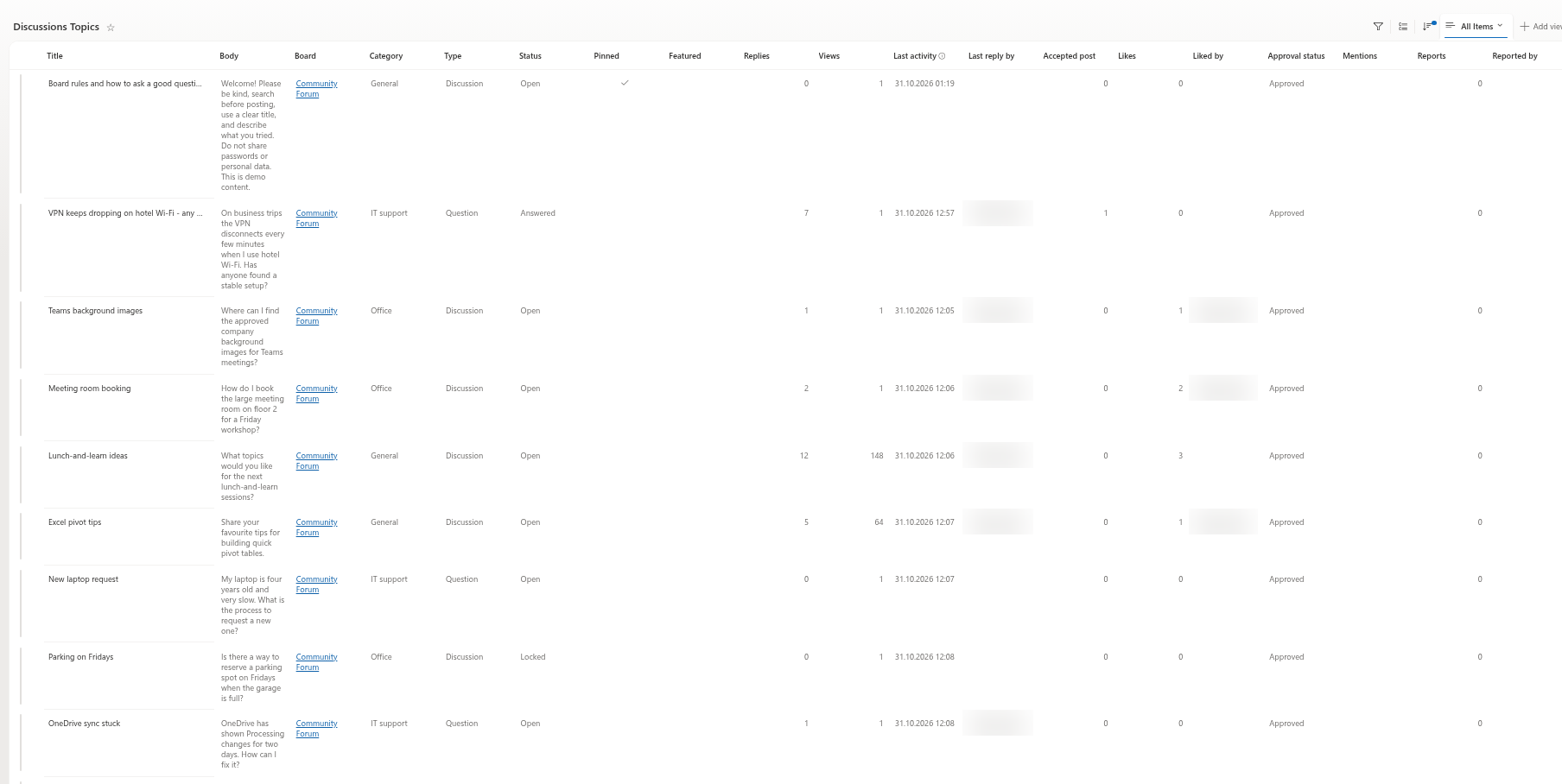
Discussions Topics
One item per topic. Title is the topic title; Created and Created By are the posting time and the author; Attachments holds the files attached to the topic.
| Column | Internal name | Type | Indexed | Default / values | Purpose |
|---|---|---|---|---|---|
| Body | VtxBody | Multiple lines of text (enhanced rich text) | No | Empty | The text of the topic as sanitised HTML |
| Board | VtxBoard | Lookup to Discussions Boards (Title) | Yes | - | The board the topic belongs to |
| Category | VtxCategory | Single line of text | Yes | Empty | The category name; empty for a topic without a category |
| Type | VtxTopicType | Choice | Yes | Discussion, Question; default Discussion | Whether the topic is a discussion or a question |
| Status | VtxStatus | Choice | Yes | Open, Answered, Locked; default Open | Locked while a moderator keeps the topic locked; otherwise Answered when an answer is accepted and Open when the answer is unmarked or the accepted reply is deleted. The answered state shown by the web part is derived from Accepted post, not from this column, so locking a question does not change its badge or its view |
| Pinned | VtxIsSticky | Yes/No | Yes | No | Pinned topics are listed first |
| Featured | VtxIsFeatured | Yes/No | Yes | No | Shown in the Featured view |
| Replies | VtxReplyCount | Number | No | 0 | The number of approved replies, maintained by the web part |
| Views | VtxViewCount | Number | No | 0 | Incremented the first time the topic is opened in a browser session |
| Last activity | VtxLastActivity | Date and time | Yes | - | Time when an approved reply was added or a reply was approved; initially the topic creation time. The topic list sorts by this value. Deleting or rejecting a reply does not restore the preceding activity time |
| Last reply by | VtxLastReplyBy | Person | No | - | The author of the last approved reply - for a reply approved from the moderation queue, its author, not the moderator |
| Accepted post | VtxAcceptedPostId | Number | No | 0 | The ID of the accepted reply in Discussions Posts; 0 when none. The source of the answered state: the Answered badge and the Answered view are topics with a value greater than 0, the Unanswered view is questions with 0 |
| Likes | VtxLikeCount | Number | No | 0 | The number of likes on the topic |
| Liked by | VtxLikedBy | Person (multiple) | No | - | The users who liked the topic; one like per user |
| Approval status | VtxApprovalStatus | Choice | Yes | Approved, Pending, Rejected; default Approved | The moderation state; members see Approved items and their own, moderators see everything |
| Mentions | VtxMentions | Person (multiple) | No | - | The users mentioned with @ in the body, for notifications |
| Reports | VtxReportCount | Number | Yes | 0 | The number of reports; the topic appears in the moderation queue while it is greater than 0 |
| Reported by | VtxReportedBy | Person (multiple) | No | - | The users who reported the topic; one report per user |
| Legacy id | VtxLegacyId | Single line of text | Yes | Empty | {source list ID}:{item ID} of the classic Discussion Board item the topic was imported from; lets the importer skip already imported topics |
Discussions Posts
One item per reply. Title is set to Re: followed by the topic title; Created and Created By are the posting time and the author; Attachments holds the files attached to the reply.
| Column | Internal name | Type | Indexed | Default / values | Purpose |
|---|---|---|---|---|---|
| Body | VtxBody | Multiple lines of text (enhanced rich text) | No | Empty | The text of the reply as sanitised HTML |
| Topic | VtxTopic | Lookup to Discussions Topics (Title) | Yes | - | The topic the reply belongs to |
| Parent post | VtxParentPost | Lookup to Discussions Posts (Title) | Yes | - | The reply this one answers; empty for a top-level reply |
| Path | VtxPath | Single line of text | Yes | Empty | The IDs of the ancestor replies written by the web part, for example /12/15/; / for a top-level reply |
| Depth | VtxDepth | Number | No | 0 | The nesting level: 0 for a top-level reply, 1 for a reply to it, and so on |
| Is accepted answer | VtxIsAccepted | Yes/No | No | No | Yes for the reply accepted as the answer; at most one per topic |
| Likes | VtxLikeCount | Number | No | 0 | The number of likes on the reply |
| Liked by | VtxLikedBy | Person (multiple) | No | - | The users who liked the reply |
| Approval status | VtxApprovalStatus | Choice | Yes | Approved, Pending, Rejected; default Approved | The moderation state of the reply |
| Mentions | VtxMentions | Person (multiple) | No | - | The users mentioned with @ in the reply |
| Reports | VtxReportCount | Number | Yes | 0 | The number of reports on the reply |
| Reported by | VtxReportedBy | Person (multiple) | No | - | The users who reported the reply |
| Legacy id | VtxLegacyId | Single line of text | Yes | Empty | {source list ID}:{item ID} of the classic reply this one was imported from |
The lookups to the topic and to the parent reply are created without cascade or restrict delete behaviour: deleting a topic in the list does not delete its replies, and deleting a reply does not delete the replies under it. The Delete command of the web part behaves differently: it deletes a topic together with all its replies and the inline images of the Discussions Assets library, and it refuses to delete a reply that has replies of its own. The web part attaches replies whose parent is missing to the top level of the thread so that nothing disappears from view; see KB10432. Counters, Last Activity or Best Answer Look Wrong.
Deleting a topic attempts to remove its inline images from the assets library; this cleanup is best effort and can leave files behind if it fails.
Discussions Subscriptions
One item per user and target. Title is Board:ID or Topic:ID.
| Column | Internal name | Type | Indexed | Default / values | Purpose |
|---|---|---|---|---|---|
| User | VtxUser | Person | Yes | - | The subscriber |
| Target type | VtxTargetType | Choice | Yes | Board, Topic; default Board | Whether the subscription is to a board or to a topic |
| Target id | VtxTargetId | Number | Yes | 0 | The ID of the board item or of the topic item |
| Frequency | VtxFrequency | Choice | No | Immediate, Daily, Weekly; default Immediate | How often the subscriber wants to be notified |
| Board | VtxBoard | Lookup to Discussions Boards (Title) | Yes | - | The board of the subscription (also for topic subscriptions), so a flow can group by board |
A user has one item per target; following again with another frequency updates the existing item, and unfollowing deletes it. The author of a topic is subscribed to it automatically with Immediate. The web part only maintains this list; sending email is the job of a Power Automate flow whose contract is described in KB10414. How Notifications Work in Discussions: Subscriptions, Mentions and Power Automate.
Discussions Assets
A document library for the images inserted into topics and replies with the editor (pasted, dropped or chosen with Insert image). Each image is uploaded under a unique name into a folder named after the current year (2026, 2027, …) to organise images by year; this does not guarantee that a folder stays below the list view threshold. The library has a single custom column:
| Column | Internal name | Type | Indexed | Default / values | Purpose |
|---|---|---|---|---|---|
| Discussions asset | VtxDiscussionsAsset | Single line of text | No | Empty | Marker column only; lets the library be recognised whatever its title |
Files attached to a topic or a reply with Attach file are not stored here - they are list item attachments of the topic or reply item, kept with the item in the Discussions Topics or Discussions Posts list.
Choice values
The choice columns store the English values below regardless of the interface language; the web part translates them for display.
| Column | Values | Shown as |
|---|---|---|
Mode (VtxMode) | Discussion, QnA, Mixed | Discussions only, Questions and answers only, Discussions and questions |
Type (VtxTopicType) | Discussion, Question | Discussion, Question |
Status (VtxStatus) | Open, Answered, Locked | the Locked badge; the Answered badge is derived from Accepted post (see above); Open has no badge |
Approval status (VtxApprovalStatus) | Approved, Pending, Rejected | the Awaiting approval and Rejected badges; Approved has no badge |
Target type (VtxTargetType) | Board, Topic | - |
Frequency (VtxFrequency) | Immediate, Daily, Weekly | Immediately, Daily digest, Weekly digest |
What you can edit in the lists
The web part writes the lists through the SharePoint REST API as the signed-in user, and it reads them back on every load, so changes made in the list forms are picked up on the next reload. Some columns are safe to edit, some are maintained by the web part and better left alone:
| Safe to edit in the list | Maintained by the web part |
|---|---|
| Title, Description, Mode, Categories, Require approval of a board - or, more conveniently, the Board settings panel of the web part | Replies, Views, Last activity, Last reply by of a topic and Topics of a board |
| Category, Pinned, Featured and Status (Locked) of a topic; Approval status of a topic or reply. The title, category and body of a topic can also be changed with Edit in the topic view | Accepted post of a topic together with Is accepted answer of the reply - change them only together; the answered state follows Accepted post |
| Body of a topic or reply (plain HTML; the web part sanitises it on display) | Path, Depth, Parent post, Topic of a reply - moving a reply by hand breaks the thread |
| Frequency of a subscription | Likes / Liked by, Reports / Reported by |
Counters are updated from loaded values by increments or decrements, rather than recalculated from the lists on every activity. Failed or concurrent writes can leave them inaccurate, and another action does not necessarily correct a manual value. Imported historical likes can exceed the number of people in Liked by; preserve that historical count. Use moderation commands to change approval, because editing the column directly does not update the related counters.
❗ Important
Do not delete or rename the Vtx columns, and do not change their types. The web part recognises the lists by the IDs of the marker columns and reads every other column by its internal name; a missing column causes the board to fail with an error. Renaming the display name of a column or of a list is harmless.
💡 Tip
Because the lists are ordinary SharePoint lists, you can build what the web part does not offer: a list view of topics with Approval status = Pending for moderators, an Export to Excel of the topics for a report, a Power BI report over Discussions Topics and Discussions Posts, or a Power Automate flow on Discussions Subscriptions for email delivery.