Discussions
General
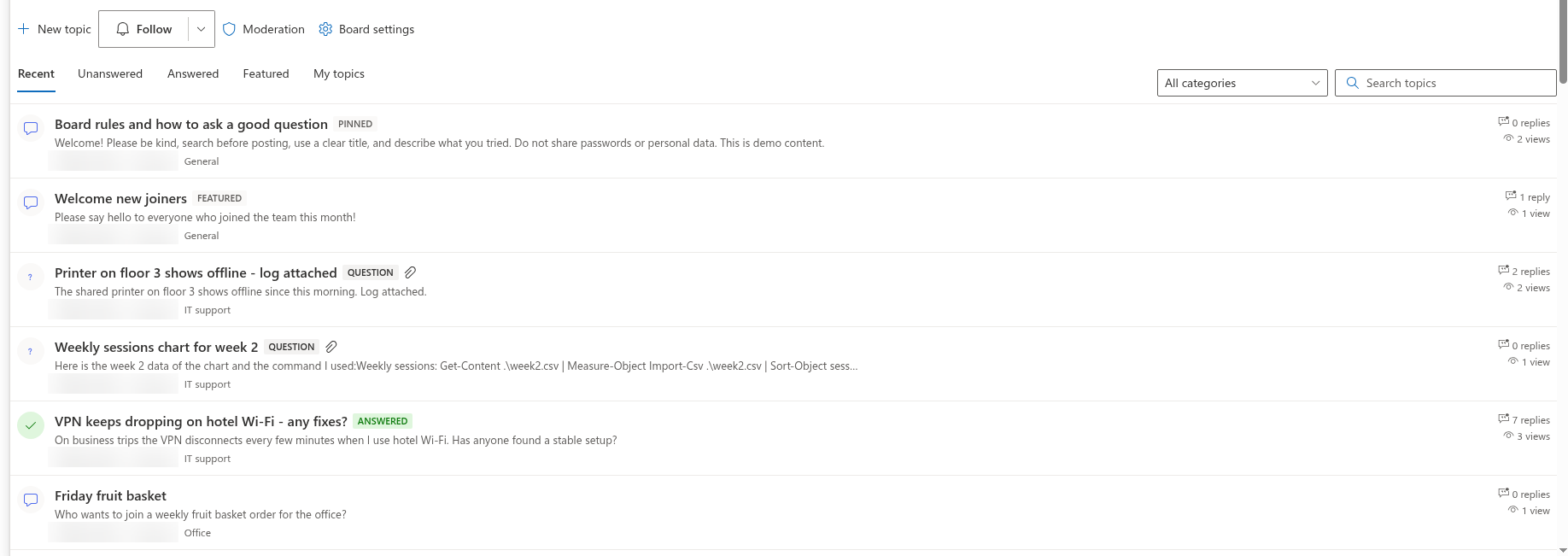
What is Discussions? Discussions is a discussion board and Q&A forum for modern SharePoint Online pages and Microsoft Teams. A board holds topics - discussions or questions - with threaded replies, a best answer, likes, categories and views, follow subscriptions and moderation. Everything is stored in lists on the site where the board is created. See KB10390. Discussions. Solution Overview.
Do I need Viva Engage or a Teams license to use it? Viva Engage is not required. To use Discussions on a SharePoint page, users need access to SharePoint Online; using it inside Teams also requires access to Teams. The board stores its content in SharePoint. KB10394. Discussions vs. the Classic SharePoint Discussion Board vs. Viva Engage vs. Teams Channels: Which to Choose
Which web parts are included? Two: Discussions displays a board, and Discussions Activity displays recent topics with links to the board page. Both work on SharePoint pages. The supplied Teams app package includes Discussions only; to show Activity in Teams, add a SharePoint page containing it using an available SharePoint page tab.
How is Discussions different from Vitextra Questions and Answers? Questions and Answers is a curated FAQ: editors publish answers that readers browse in an accordion. Discussions is a forum: members start topics, reply to each other in threads, mark the best answer and follow what interests them. Many intranets use both - see KB10217. Questions and Answers. Solution Overview.
Data and security
Where is the content stored? The board content is stored in four SharePoint lists and one document library on the board’s site. The library holds inline images; attachments belong to list items. Browser session storage records viewed-topic markers. Licensing and telemetry requests are separate from board content. KB10411. Where Discussions Stores Your Data: Lists, Columns and Privacy · KB10363. Where Vitextra Products Store Your Data: Privacy, Data Residency and GDPR
Can I rename the lists? Yes. The web part recognizes its lists by the fixed ids of their marker columns, not by their titles, so a list can be renamed without breaking the board. All custom columns start with Vtx; keep them in place.
Does the solution request Microsoft Graph permissions or admin consent? The package requests no Microsoft Graph API permissions. Board operations use SharePoint REST with the signed-in user’s permissions; the importer also uses SharePoint CSOM to restore original authors and dates. Licensing, telemetry and product-file requests are described separately in the privacy article. KB10360. How to Approve Microsoft Graph API Permissions for Vitextra Solutions in the SharePoint Admin Center · KB10413. API Permissions and Admin Consent for Discussions
Does the content fall under retention, eDiscovery and sensitivity labels? The content uses SharePoint and Microsoft Purview controls where supported and configured by your organization. List items support retention labels, but not retention policies. Auditing, eDiscovery and site sensitivity settings depend on the relevant Microsoft 365 configuration and licensing. Microsoft Learn.
Does removing the solution delete the boards? No. Removing the app from the site or the package from the App Catalog leaves the lists and their content on the site. See KB10362. How to Remove a Vitextra Solution from SharePoint Online and Microsoft Teams.
Permissions
Who can read, post and moderate? Access follows the underlying SharePoint permissions. The web part uses Add Items to enable participation and Manage Lists to identify moderators; SharePoint still checks the permissions required for each write. The standard Edit level includes Manage Lists, so editors can be moderators too. Use Contribute for ordinary participants when moderation must remain separate. KB10408. Permissions in Discussions: Who Can Read, Post and Moderate
Do guests work? Yes, by site permissions: a guest with read access reads the board, a guest with contribute access posts. No separate setting exists.
Who can create a board? Creating the first board also creates the site lists, which needs Manage Lists on the site. Once the lists exist, a page editor with Add items can pick an existing board or create another one without that permission. If the permission is missing, the web part reports it with You do not have permission to create lists on this site. Ask the site owner to set up the board..
📝 Note
Read-only visitors see the board, open topics and read replies, but the Like, Reply, Follow and Report buttons are disabled or hidden for them, and the view counter is not updated on their behalf.
Boards and topics
What are the board modes? Discussions only - every topic is a discussion, the Unanswered and Answered views are hidden. Questions and answers only - every topic is a question. Discussions and questions - members choose the type of each topic. See KB10392. Creating Your First Board: Modes, Categories and Approval.
How many boards can a site have? As many as you need; each board is an item of the Discussions Boards list, and each Discussions web part shows one board. The board pickers in the web parts list up to 500 boards of the site.
Can I change the mode, the categories or the approval setting after the board is created? Yes. A moderator opens the board and clicks Board settings in the command bar. The panel contains Board name, Description, Mode, Categories (one per line) and Require approval of new posts; Save writes the changes to the board item, and the web part applies them at once. The board item in the Discussions Boards list (Site contents) can still be edited directly; other web parts read the change on the next load.
How deep can replies be nested? There is no configurable maximum depth, but the parent path is limited to 255 characters, so nesting is not unlimited. A reply with nested replies cannot be deleted separately; delete its descendants first or delete the whole topic.
Can I edit or delete a topic after it is posted? Yes, subject to permissions and the topic’s locked state. The author and moderators can edit or delete a topic where those actions are available. Deleting a topic deletes its replies too. Cleanup of inline images is attempted separately and may fail; external images are not deleted. KB10399. Replying in Threads: Reply, Edit and Delete
Who can mark the best answer? The author of the question and any moderator, with the Mark as answer button under a top-level reply. A question has one accepted answer at a time; it is shown at the top of the thread and moves the question to the Answered view. The Mark as answer and Unmark answer buttons are hidden while the topic is locked; a locked question keeps its accepted answer, its Answered badge and its place in the Answered view. If the accepted reply is deleted, the question returns to the Unanswered view. See KB10400. Marking the Best Answer in Q&A Topics.
What does the search box search? The titles of the topics of the current board, combined with the selected view and category. Search in the body text is not part of the web part.
Why can't a colleague see my post? The board probably requires approval: posts by members wait in the moderation queue until a moderator approves them. The author sees their own post with the Awaiting approval badge; moderators see everything, including pending and rejected items; other members see only approved posts. A rejected reply stays visible to its author with the Rejected badge and to moderators. A direct link to a topic that is awaiting approval or rejected shows other users This topic is not available. It may be awaiting approval or may have been removed. instead of the topic. See KB10430. Why a Post Is Not Visible: Approval, Rejection and Visibility Rules. Posts by moderators are approved immediately.
Can a rejected topic or reply be approved later? Yes. The Moderation screen lists them in the Rejected topics and Rejected replies sections with the Approve and Delete buttons; approving a rejected reply records its author in Last reply by and counts it again. An approved topic or reply that has been reported can be rejected from the Reported topics and Reported replies sections.
Why do the reply or view counters look off? The counters are stored on the topic and updated by the web part when a reply is posted, approved, rejected or deleted and the first time a topic is opened in a browser session - opening it again in the same session does not count; the update is best-effort, and readers without write permission do not update views. See KB10432. Counters, Last Activity or Best Answer Look Wrong.
Notifications
How do notifications work? The web part records who follows which board or topic and with which frequency - Immediately, Daily digest or Weekly digest - in the Discussions Subscriptions list, and stores the people mentioned in a post in the Mentions column. The e-mails are sent by a Power Automate flow that a site owner sets up on those lists; the events, recipients and frequencies it should handle are described in KB10414. How Notifications Work in Discussions: Subscriptions, Mentions and Power Automate.
I followed a topic but get no e-mails. Why? Because the flow that sends them is not in place yet, or it is not running. The web part itself does not send mail and requests no mail permissions; following records the subscription only.
❗ Important
The Power Automate flow template for notifications is documented but not shipped with version 26.11.4. Plan the flow as part of the rollout if your users expect e-mails.
Migration
Can I import an existing classic Discussion Board? Yes. A moderator opens the importer in page edit mode, selects a classic Discussion Board (list template 108) on this or another site in the tenant, analyzes it and imports it. Topics, replies, accepted answers, likes and attachments are copied; restoring original authors and dates depends on permissions and successful CSOM calls. A repeat run avoids creating duplicate items but can update topic metadata. It does not retry every failed attachment or system-field operation, and a resumed import may not preserve all nesting under existing replies. Images referenced by external URLs remain at their original locations. KB10417. How to Import a Classic SharePoint Discussion Board into Discussions · KB10418. What the Importer Copies and How It Rebuilds Reply Threads
Our boards are on SharePoint Server. Can they be moved? Yes, in two steps: migrate the classic list to SharePoint Online with a standard migration tool, then import it into a board with the wizard, which rebuilds the reply hierarchy that migration tools tend to flatten. The classic fields needed to reconstruct reply relationships must survive that migration; check the analysis before importing.
Teams, mobile and languages
Does Discussions work in Microsoft Teams? Yes. After the package is synchronized to Teams from the App Catalog, the board can be added as a channel tab and opened as a personal app; the tab is configured by picking a board, exactly like the web part. See KB10393. How to Add Discussions to Microsoft Teams.
Does it work on a phone? The web part has a responsive layout and is shown with the page in the SharePoint mobile app and in Teams mobile. What works on a phone and what is limited is described in KB10416. Discussions in the SharePoint Mobile App and Teams Mobile.
Which languages does the interface have? The web part labels — views, buttons, badges and column names of created lists — support multiple languages, including English, Russian, Latvian, German, French, Japanese, Dutch and Spanish. The interface and relative times (such as 3 hours ago) follow the supported locale for the user’s SharePoint UI language, with English as the fallback for unsupported languages. The texts of topics and replies are, of course, whatever the authors wrote. Since version 26.10.3, hovering over the relative time on a topic and on each reply shows the full date and time in the long localized format, in the time zone of your browser - for example October 29, 2026 10:15 AM on English sites and 29 октября 2026 г., 10:15 on Russian sites. The relative times in the topic list, in the Discussions Activity web part and in the moderation queue have no such tooltip.
Does it support SharePoint Server (on-premises)? No. Discussions is built for SharePoint Online and Microsoft Teams.
Limits
Are there size limits for images and attachments? An inline image may be up to 10 MB; a larger image is rejected, and the reason - The image is larger than 10 MB. - is shown above the editor. Attachments follow the limits of SharePoint list attachments and the file types blocked in your tenant. See KB10431. Images or Attachments Fail to Upload.
How large can a board grow? Topics are paged, with 5–100 per page. All visible replies of a topic are loaded in batches of 500. Paging and indexes do not guarantee that a query will avoid SharePoint’s list view threshold. Large threads also increase browser work. All boards on a site share the same lists, so assess their combined volume. KB10427. Limits and Performance: Large Boards, Long Threads and the List View Threshold
Licensing and updates
Is there a trial, and how is it licensed? A free 14-day trial with full functionality starts when the web part is first used in the tenant. After the trial, both web parts - Discussions and Discussions Activity - show a license message instead of the board until a plan is activated; nothing is deleted - the lists and their content stay on the site. Discussions is licensed per Microsoft 365 tenant with a flat price in two plans, Standard and Plus, covering all sites, users and Teams.
Where do I see the license status and the version? In the About group at the bottom of the property pane of either web part: the product name, Version, Status (Trial version, Active or Expired) and the Tenant id. The version scheme is explained in KB10319. Vitextra Product Versioning: How to Read Version Numbers. The group may be absent if the license or environment information has not loaded.

How do I update to a new version? Upload the new package to the App Catalog; page editors see a There is a new version of this app. Get it now. notice in edit mode. Lists and columns that a new version adds are created automatically the next time a moderator opens a page with the web part or runs the board setup. See KB10050. How to Update a Vitextra SPFx Solution in SharePoint Online.
Tenant App Catalog or site collection App Catalog? Both work. The tenant App Catalog makes the web parts available on every site and in Teams; a site collection App Catalog limits them to one site collection. See KB10361. Tenant App Catalog vs. Site Collection App Catalog: Where to Deploy Vitextra Apps.
💡 Tip
To deploy the solution, follow KB10035. How to Install a Vitextra Product in SharePoint Online; to put the first board on a page, follow KB10391. How to Add and Configure the Discussions Web Part.