Policy Acknowledgement
Publish a new version when the policy content changes and the change must be identified separately from the existing release. First decide whether employees need to acknowledge again. That decision affects both the publication type and the assignments you create afterward; changing the source file alone does neither.
Prepare the revision
Use a policy owner, administrator or compliance-manager account that can manage the card. Review the current version, existing campaigns and source access. Confirm that the intended revised content is at the configured source URL and that the policy is not archived. If it is archived, follow KB10518. How to Archive a Policy and Restore It as a Draft before attempting publication.
Choose a unique version number. The suggested number increases the major component for a material change and the minor component for an editorial change. For example, 1.0 becomes 2.0 or 1.1. Avoid reusing an earlier number: snapshot and metadata file creation use overwrite behavior, so duplicate numbering is not a safe way to preserve a separate release.
Choose the type of change
| Choice | Intended use | Current effect |
|---|---|---|
| Material change — everyone acknowledges again | Changes that require a fresh confirmation. | Publishes a version; the main action then opens the update-campaign wizard for an existing policy. |
| Editorial change — acknowledgments are carried over | Changes for which earlier confirmations remain acceptable. | Updates acknowledged assignments of the previous current version to the new version number. |
Editorial carry-over does not create a fresh employee confirmation. The original evidence event and its recorded text remain the original record; the assignment's version and comment are changed. Do not report a carry-over as proof that the employee personally read the revised wording.
Publish the version
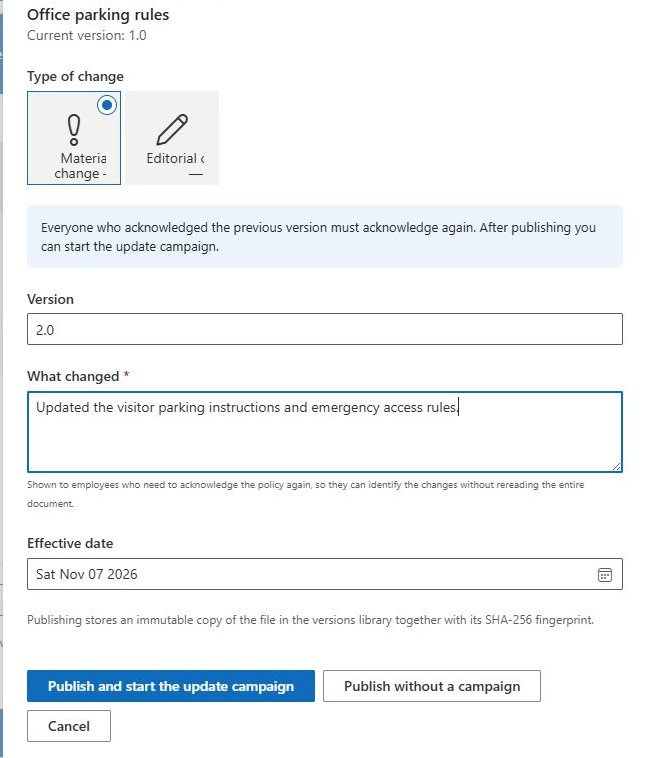
- Select the policy in Policy Manager and choose Publish a new version.
- Set Type of change and review Version.
- Enter What changed. For a material revision of an existing version, a nonempty change description is required.
- Review Effective date. Publication changes the policy to published immediately; the date is not a deferred-publication scheduler.
- For a material revision, use Publish and start the update campaign to continue to the wizard, or Publish without a campaign when distribution should be handled separately. For an editorial revision, use Publish.
Decide what the change means for employees
Consider a correction to formatting that leaves the intended employee commitment unchanged. The owner may decide an editorial release is appropriate. In that case, inspect how acknowledged assignments are carried forward and explain that the retained receipt is still the original confirmation. A newer assignment version is not evidence of a new employee action.
Now consider a revised procedure that changes what employees must do. If the organization requires them to acknowledge the revised obligation, use the material-change path and explicitly launch the new-version campaign. Write a change summary that identifies the practical difference, so the reader can understand why another task has arrived instead of seeing only a new number.
The product does not decide whether a change is substantively important for your organization. Make that decision before publication and apply it consistently. A material revision without a launched campaign leaves the distribution step unfinished; an editorial carry-over should not be presented as fresh consent to changed obligations.
Account for people at different stages
| Employee situation before revision | What to check after publication |
|---|---|
| Already acknowledged the previous version | Whether the decision calls for carry-over or a separate new-version assignment. |
| Still has the previous version open | Whether the old task remains and which live source it now displays. |
| Exempted from a previous assignment | Whether the new campaign audience and assignment decision are appropriate for the new release. |
| Newly included employee | Whether the person receives the intended current release and can access its content. |
Review these groups rather than testing only a newly created task. Publication does not automatically withdraw every older assignment, and an exemption belongs to its assignment rather than being a universal ban on future work. Before broad distribution, inspect one representative record from each applicable group.
Keep the version number, summary, retained file and campaign decision together in your release review. If an error interrupts publication or distribution, this record helps establish which stage actually completed and which employees still need action. Do not repair uncertainty by overwriting a previous version number or by treating a second campaign as a replacement for understanding the first.
Launch and verify the update campaign
Opening the wizard is not the same as launching it. Inspect the policy version, audience preview and deadline, then explicitly launch as described in KB10503. How to Create and Launch a Policy Acknowledgement Campaign. Employees who already acknowledged another version are eligible for a new-version assignment, subject to the normal audience and duplicate checks.
Test one new assignment and inspect its version, change summary and receipt. Also inspect an older assignment if it remains open: the publication operation does not cancel every old assignment automatically.
❗ Important
The reader currently uses the policy's source content, and the acknowledgement payload takes the policy's current content hash while identifying the assignment version. If an older assignment survives a source/version update, do not assume it presents or records an exact archived-version match. Reconcile outstanding assignments and verify the content/version relationship before collecting confirmations.
If publication reports an error, reload the card and history before retrying. Snapshot creation, version metadata, policy update and carry-over are separate operations, so inspect whether part of the change already completed. See KB10515. How to Inspect Policy Version History and Document Snapshots for history and KB10519. What to Do When Policy Content Changes Without a New Version for source drift.