Policy Acknowledgement
Different screens intentionally show different subsets of policy data. A policy missing from the library, an employee missing from an audience preview and an assignment missing from a report require different checks. Identify the expected record and the screen before changing the policy or launching another campaign.
Establish what should exist
Record the hub, policy identifier, version, campaign and employee account. Determine whether you expect a policy card, an assignment or a completed acknowledgement. Publishing a card does not itself create employee assignments, and opening a library item does not assign it to the reader.
Use an administrator to inspect the relevant records when the affected account cannot see them. Confirm the connection first using KB10535. Troubleshooting Policy Hub Detection and Access. A page connected to another valid hub may show an empty or different data set without a connection error.
Check policy visibility
Clear search, category and status filters in Policy Manager. Authors may see an owner-filtered set, so compare the card's owner with the signed-in author. Do not assume that absence from this filtered interface means the SharePoint record has been deleted.
Policy Library shows published policies and policies under review, not drafts or archived cards. Its configured category allowlist and search also restrict results. Search checks the title, description and tags; it is not a full-text search inside source documents. See KB10528. How to Browse and Search the Policy Library for the library's selection rules.
Check audience eligibility and launch
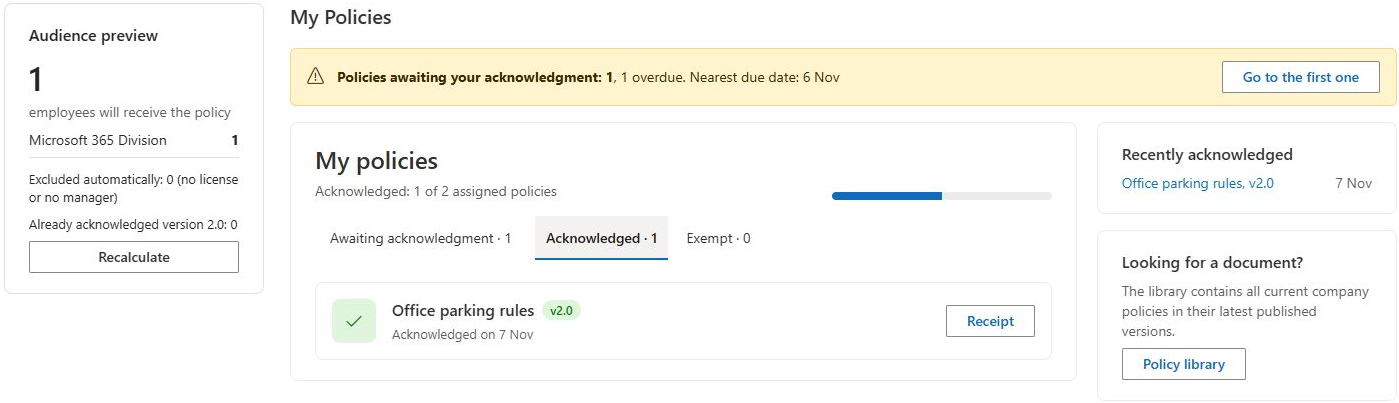
- Reopen the campaign audience configuration and preview it.
- Verify the intended users, groups, attribute rules and explicit exclusions.
- Check whether manager-related exclusions remove the employee.
- Confirm that the account is an enabled directory member; the audience query excludes guest and disabled accounts.
- Confirm that the campaign was actually launched and inspect the resulting assignments.
Named additional users can bypass attribute rules, but exclusions still apply. Group membership and directory attributes may differ from what a policy owner expects. The audience's no-license exclusion uses the directory account's assigned-license data; check that data when investigating an exclusion. Do not confuse this audience rule with the separate All licensed users role option, whose role resolver does not validate individual licences.
At launch, the application skips a user who already has a non-exempt assignment for the same policy version, including assignments from other campaigns. The preview's already-acknowledged count does not represent every possible duplicate skip. A campaign can also be created before all assignment writes finish; check for a partial launch before retrying.
Check personal lists and reports
Compare the employee's current account identifier with the account stored on the assignment. My Policies normally uses the directory user principal name when available, while the pending-policy banner uses the page-context login name. A claims-form login or a changed account can therefore expose a matching problem rather than a missing assignment.
Review status and date filters. The banner includes assigned and overdue items, while other personal views also handle review or paused states. Historical reports exclude assignments created after the selected date. Team views depend on current directory relationships and stored manager information; their scope can differ after an employee changes manager.
❗ Important
Do not create duplicate policy cards or repeatedly launch campaigns as a visibility repair. First locate the existing card and assignments. Otherwise you can add new work while leaving the original filtering, account or permission problem unresolved.
Confirm the outcome
After correcting the identified cause, reload the affected screen and verify the expected policy, version, account and status. Check one affected employee before applying a wider change. Record any remaining mismatch with the relevant identifiers and filters. For detailed audience rules, see KB10520. How to Review a Campaign Audience Before Launch; for report date calculations, see KB10531. How Policy Compliance Is Calculated for a Selected Date.