このコンテンツはお使いの言語では利用できません。

This article describes how to uninstall a Vitextra product from a SharePoint on-premises environment.

Prerequisites

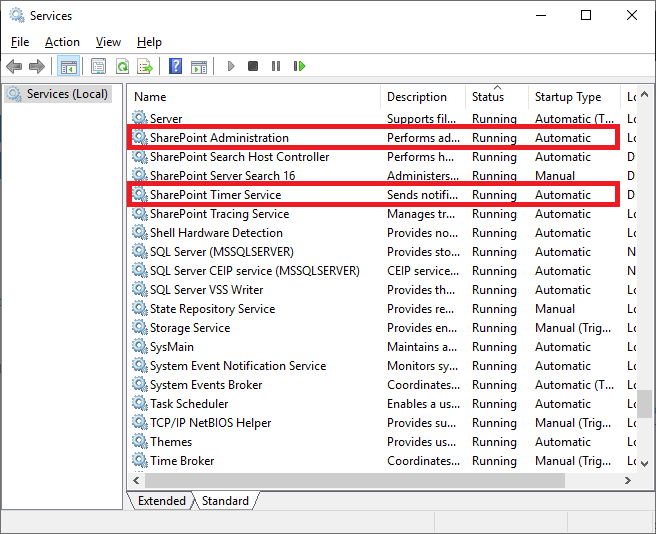
SharePoint Services

Before you begin, make sure these services are running on the SharePoint Server:

  • SharePoint Administration
  • SharePoint Timer Service

Services running on the server

Services running on the server

Required Permissions

To perform the uninstallation, you need the following permissions:

  • Membership in the local server's Administrators group.
  • Membership in the Farm Administrators group.

Installation Package

Download the product's ZIP file (*.zip) from the downloads page and extract it on the SharePoint front-end server where you'll run the uninstallation.
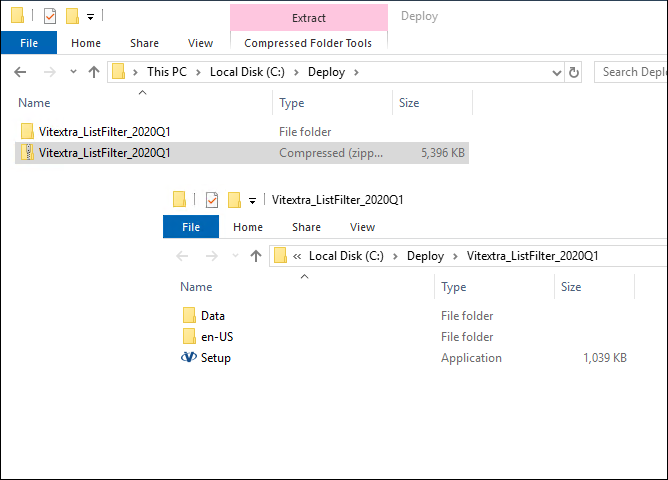
Extracted installation package

Extracted installation package

Uninstalling

To uninstall the Vitextra product, run the product installer and select Uninstall:
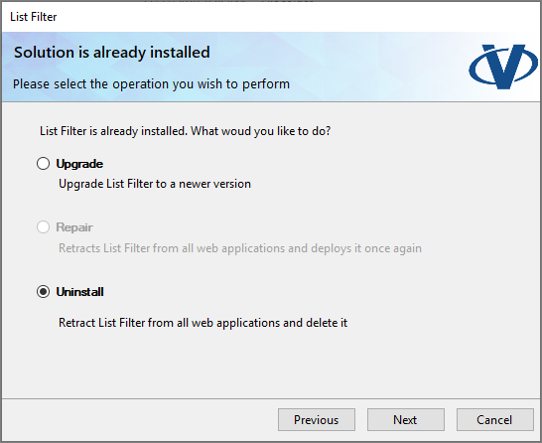
Vitextra product installer

Vitextra product installer

Click Next and wait for the uninstallation to complete.
質問と回答

この記事について質問すると、サポートチームから公式回答を受け取れます。

まだ質問はありません。最初の質問を投稿しましょう。

注目の記事

Discussions がデータを保存する場所: リスト、列、プライバシー

SharePoint Online と Microsoft Teams 向けの Vitextra Discussions Web パーツに関する管理者およびセキュリティ担当者向けのリファレンスです。Web パーツがサイトに作成する 4 つのリストとドキュメント ライブラリ、列 ID によってリストが認識されるため名前を変更できること、トピック、返信、メンション、いいね、サブスクリプションを保持する列、添付ファイルとインライン画像の保存場所、Web パーツ プロパティに保持される内容、各呼び出しに使用される ID、Vitextra に送信される情報、Web パーツやパッケージを削除したときのデータの扱いについて説明します。

28 3 分
List Filter Online のフィルター ペイン コントロールとサポートされる列の種類

Vitextra List Filter Online Web パーツのフィルター ペインのリファレンスです。構成ツールで列とフィルター コントロールを選ぶ方法、各コントロール (テキスト、テキスト (オプション付き)、ドロップダウン、日付ピッカー、日付範囲、相対日付、ユーザーまたはグループ、用語、数値範囲、はい/いいえ) の動作と生成される CAML 比較、SharePoint の列の種類と使用可能なコントロールの対応表を説明します。

103 3 分
Password Vault がブロックされる理由: 「間違った PINコードが何度も入力されました。」

Vitextra Password Vault のリセット画面に関するトラブルシューティング ガイドです。間違った PIN コードを 5 回連続で入力すると保管庫がブロックされる理由、ブロックがすべてのページ、デバイス、Microsoft Teams に適用される理由、[リセット] ボタンで削除される内容、保管庫をリセットして新しい PIN コードを設定する手順、再びブロックされないための対策を説明します。

30 1 分

共有